SafeTensors Format Guide
Safe and fast model weight storage format by HuggingFace
Model WeightsSpecification
SafeTensors is a binary file format developed by Hugging Face for safely storing and loading machine learning model weights. Introduced in 2023 as a secure alternative to Python's pickle-based formats (PyTorch .bin, .pt files), SafeTensors eliminates the arbitrary code execution vulnerability inherent in pickle deserialization. When you load a pickle-based model file, arbitrary Python code embedded in the file executes automatically — a serious security risk when loading models from untrusted sources. SafeTensors stores only tensor data and metadata, making it impossible to embed executable code.
The SafeTensors format uses a simple structure: an 8-byte header size (little-endian uint64), a JSON header containing tensor metadata (names, data types, shapes, and byte offsets), followed by raw tensor data. The format supports all common numeric types including float32, float16, bfloat16, int8, int32, and int64. Tensors are stored contiguously in memory, enabling zero-copy loading through memory mapping — the tensor data can be accessed directly from disk without copying it into a separate memory buffer.
SafeTensors has been adopted as the default model format on Hugging Face Hub, with automatic conversion available for most model repositories. Major ML frameworks including PyTorch, TensorFlow, JAX, and ONNX Runtime support loading SafeTensors files. The format also supports sharded storage, where a single model's weights are split across multiple files with an index file mapping tensor names to their respective shards — essential for models too large to fit in a single file.
When to Use SafeTensors
SafeTensors should be your default format for storing and distributing model weights during development and for GPU-based inference. It is the standard format on Hugging Face Hub and is supported by all major training and inference frameworks. Use SafeTensors whenever you are saving training checkpoints, sharing models with collaborators, uploading models to model registries, or deploying models with GPU inference servers like vLLM, TGI, or Triton.
Choose SafeTensors over pickle-based PyTorch formats (.bin, .pt) for security — SafeTensors cannot contain executable code, eliminating the risk of supply chain attacks through malicious model files. Choose SafeTensors over GGUF when you need full-precision weights for continued training or GPU-accelerated inference, as GGUF is designed for quantized CPU inference. SafeTensors loads significantly faster than pickle files due to memory mapping and the absence of deserialization overhead.
SafeTensors is less suitable when your target deployment is CPU-based local inference (use GGUF instead) or when you need cross-framework portability with runtime optimization (consider ONNX). It is also not the right choice for very small models where the format overhead is proportionally large, though in practice this is rarely a concern.
Schema / Structure
{
  "__metadata__": {
    "format": "pt"
  },
  "model.embed_tokens.weight": {
    "dtype": "F16",
    "shape": [32000, 4096],
    "data_offsets": [0, 262144000]
  },
  "model.layers.0.self_attn.q_proj.weight": {
    "dtype": "F16",
    "shape": [4096, 4096],
    "data_offsets": [262144000, 295698432]
  },
  "model.layers.0.self_attn.k_proj.weight": {
    "dtype": "F16",
    "shape": [4096, 4096],
    "data_offsets": [295698432, 329252864]
  }
}Example Data
from safetensors.torch import save_file, load_file
import torch

# Save model weights to SafeTensors
tensors = {
    "model.embed_tokens.weight": torch.randn(32000, 4096, dtype=torch.float16),
    "model.layers.0.self_attn.q_proj.weight": torch.randn(4096, 4096, dtype=torch.float16),
    "model.layers.0.self_attn.v_proj.weight": torch.randn(4096, 4096, dtype=torch.float16),
    "lm_head.weight": torch.randn(32000, 4096, dtype=torch.float16),
}
metadata = {"format": "pt", "model_type": "llama"}
save_file(tensors, "model.safetensors", metadata=metadata)

# Load weights (zero-copy with memory mapping)
loaded = load_file("model.safetensors", device="cuda:0")
print(loaded["model.embed_tokens.weight"].shape)  # torch.Size([32000, 4096])

# Load a Hugging Face model using SafeTensors
from transformers import AutoModelForCausalLM
model = AutoModelForCausalLM.from_pretrained(
    "meta-llama/Llama-3-8B",
    torch_dtype=torch.float16,
    use_safetensors=True  # default on HF Hub
)Ertas Support
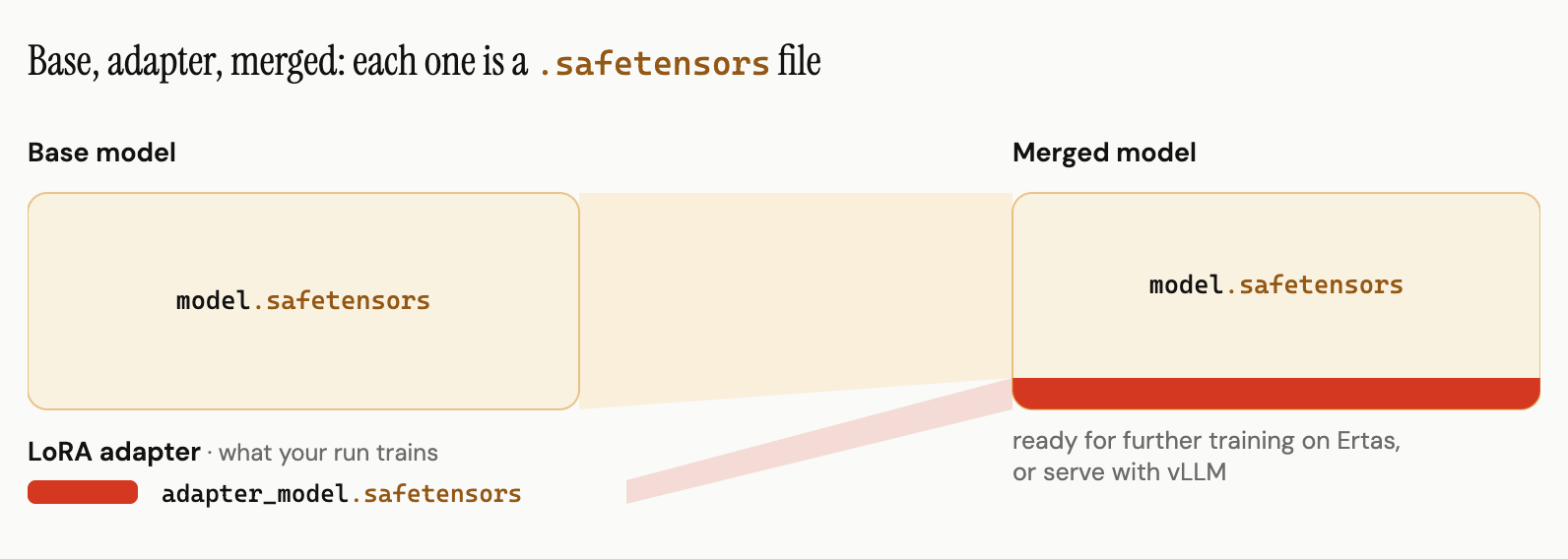
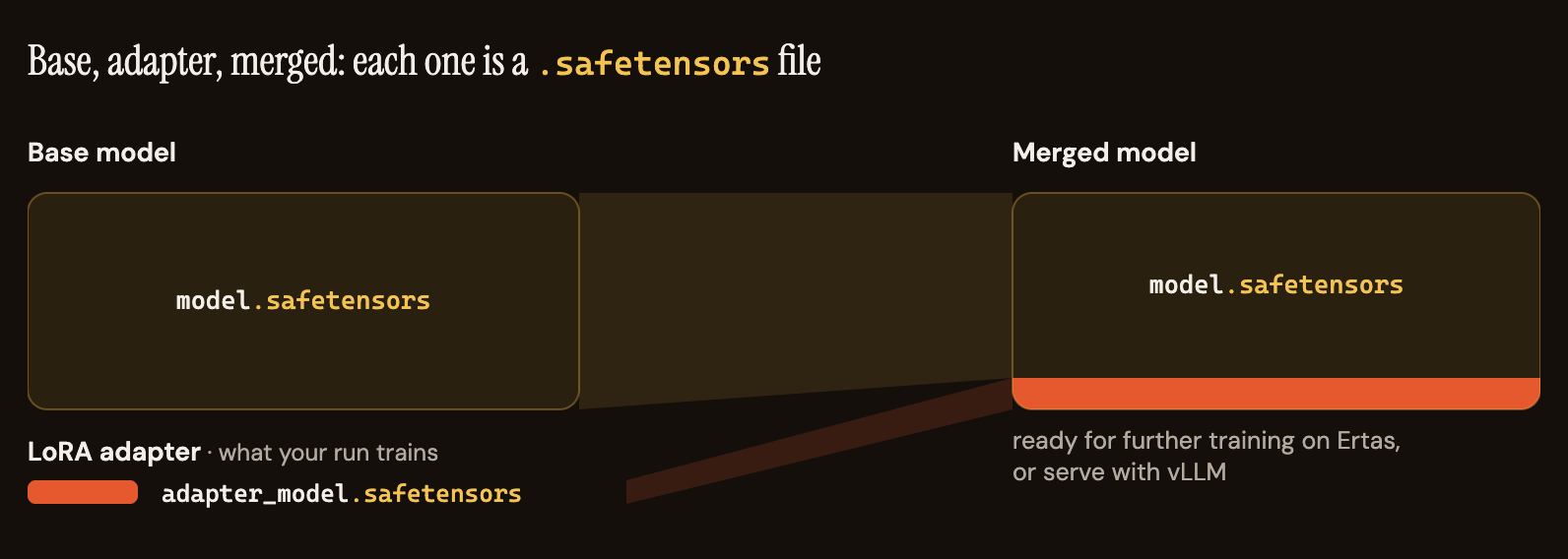
Every Ertas Studio training run produces safetensors artifacts. The LoRA adapter your run trains is saved as safetensors (adapter_model.safetensors in the LoRA download bundle), and ticking "Export full model (16-bit safetensors)" in the Training Config before queueing the run saves the full merged checkpoint (base weights plus your adapter) to Hub alongside it, complete with config.json and tokenizer files.
The merged safetensors export serves two jobs. It is the checkpoint you serve on GPU infrastructure with vLLM or other Transformers-compatible servers, and it is the checkpoint you keep training on: a merged model can be selected as the base for your next run via Continue from your models, so each training cycle folds another adapter into a model you own. If you need an on-device artifact instead, the same checkpoint converts to GGUF with llama.cpp.
Related Resources
Ship AI that runs on your users' devices.
Free plan with 30 credits/mo, no card required. Paid plans from $10/mo USD.