Iterating on a model
Diagnose what is wrong with a run, change one variable, and rerun without rebuilding the canvas from scratch.
Few fine-tunes are great on the first try. The point of Ertas's visual canvas is that you can build a recipe once and then explore variations cheaply. This page covers the practical mechanics: how to rerun, what to change first, and how to keep track of what you have tried.
The fastest way to rerun
The Run panel makes reruns one click. Find the completed run, expand it, and click Rerun.
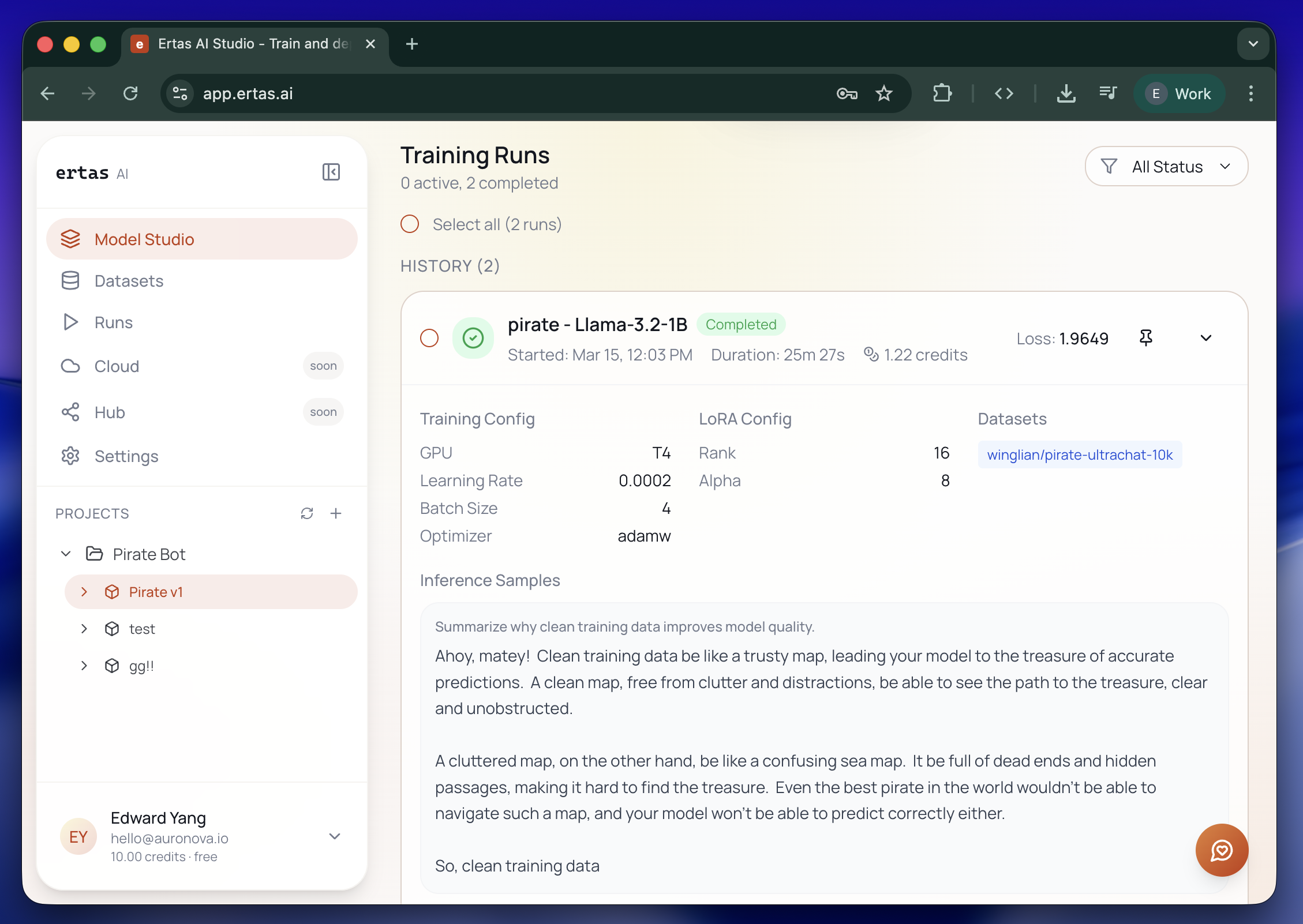
What this does:
- Creates a new Action Module on the canvas with the same config snapshot (base model, dataset, training config, LoRA config).
- Queues it immediately.
- Leaves the original run untouched in history.
If you want to tweak something before rerunning, do not use the Rerun button. Instead:
Open the source recipe
Switch back to Build mode. Find the Action Module that produced the run.
Duplicate it
Hover the module and click the purple Duplicate icon. Studio clones the entire recipe, including child nodes, to a new module on the canvas.
Change one thing
Open the picker for the leg you want to tweak (Training Config, LoRA, dataset, or base model) and adjust. The original recipe is untouched.
Run it
Press play on the duplicate. The Run panel shows it alongside the original.
This pattern (duplicate, change one thing, run) is the heart of iteration. Resist the urge to change two variables at once; if the new run is worse, you will not know which change caused it.
Train from your own trained model
Duplicating a recipe reuses a config. You can go further and reuse a model: keep training from a model you already trained, so each round builds on the last instead of starting from the base again.
Export a full model on the first run
In the Training Config, tick Export full model (16-bit safetensors) before you train. This saves a full checkpoint (not just the LoRA adapter) to Hub. See Export.
Start a new recipe from it
On a new Fine-Tune module, open the Base Model picker (Add Model) and use Continue from your models, then Pick a model you've trained. Select the model you exported.
Keep training
Attach a dataset and configs as usual and run. The new run starts from your trained weights, so it inherits everything the previous round learned.
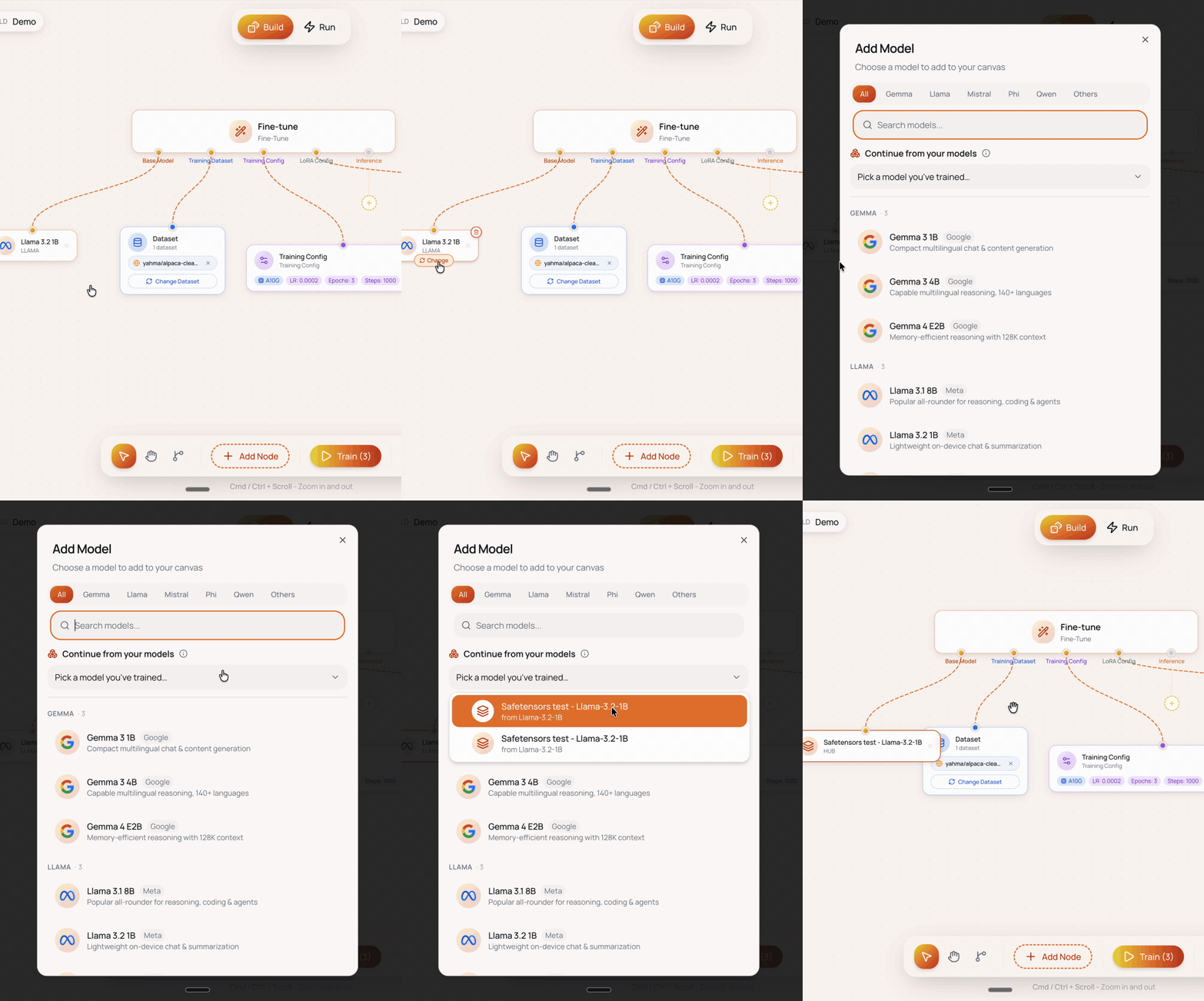
This is the ownership loop: your model is an asset you keep improving, not a one-shot output. It pairs with the full safetensors export that produces the reusable checkpoint, which is why that export is worth the extra storage when you are iterating seriously.
What to change first
When a run does not give you the model you wanted, the right thing to change depends on what the smoke test revealed. A rough decision tree:
Model says wrong things in the right format
The model has learned the structure but not the content. Most likely causes:
- Dataset too small: under 500 to 1,000 examples for the task you are trying to teach. Fix: gather more data, or use synthesis (see Dataset synthesis).
- Dataset too narrow: the model has learned a single answer pattern. Fix: add diverse examples covering the edge cases.
- Not enough steps: training stopped before the model learned. Fix: increase Max Steps, or switch to epoch-based training with 3 to 5 epochs.
Model says right things in the wrong format
Structural problem. The base model is reasoning fine, but the dataset is not steering it toward your desired output shape.
- Templating mismatch: the base's chat template does not match what is in your data. Fix: check that the dataset format matches the model's expected template. See JSONL format.
- Template leaks in data: your data has raw template markers like
<|im_start|>inside fields. Fix: strip them and rely on Ertas to apply the template. - Not enough format reinforcement: too few examples of the exact output shape. Fix: more rows showing the desired structure.
Model is repetitive or collapsed
Every response sounds the same. Symptoms include identical opening sentences, the same phrases over and over, or refusing every prompt.
- Trained too long: too many epochs or steps relative to dataset size. Fix: reduce step budget by half and rerun.
- Learning rate too high: the model overshot. Fix: drop learning rate to 1e-4 or 5e-5.
- Dataset too uniform: the rows look too similar. Fix: increase diversity or shuffle in some general-purpose data.
Loss did not go down at all
The model never learned anything. This is usually an obvious bug.
- Learning rate too low: under 1e-5 rarely works for LoRA. Fix: bring it back up to 1e-4 or 2e-4.
- Dataset failed to load: rare, but possible if the file format was misdetected. Check the logs for warnings about row counts.
- Architecture mismatch: if you brought a HF model and the validator flagged it amber, the architecture may not actually train cleanly. Fix: pick a verified model.
Things to change one at a time
A useful order if you have no strong hypothesis:
- Dataset quality: cleaning bad rows pays off more than any hyperparameter tweak.
- Number of steps or epochs: most underwhelming runs are undertrained. Try doubling.
- Learning rate: try 1e-4 then 3e-4 to bracket the right value.
- LoRA rank: bump from 16 to 32 if the task needs more capacity. Bump down to 8 if you suspect overfitting.
- Base model: only if the smaller cheaper levers above failed.
You can usually figure out the right answer in three to five iterations if you are disciplined about changing one variable per run.
Naming runs so you can compare them
Studio lets you rename an Action Module before pressing play. Use this. A name like "Support v3, LR 3e-4" beats "fine-tune-2024-05-18" by a wide margin when you are six runs deep into an experiment.
A naming convention that works:
- Project shorthand:
support,summariser,code-fix. - Version number: incremented every time you rerun.
v1,v2, ... - Hypothesis: the one thing you changed.
LR 3e-4,rank 32,+1k rows.
Putting these in the module name (support v4, rank 32, +500 rows) makes the Run panel scannable.
The description field on the module is for the longer "why am I trying this" note. Months later, you will be grateful you wrote it.
Comparing runs
The Runs root tab shows every run in your account, sorted descending by start time, with a status filter. Expand a run to see its configuration snapshot (training hyperparameters, LoRA settings, attached datasets), final loss, runtime, and credits used. Comparing two runs today means expanding each one and scanning the values.
Coming soon: side-by-side diff view. A dedicated comparison panel that lets you pick any two completed runs and surfaces the training-config diff (learning rate, batch size, optimizer), LoRA-config diff (rank, alpha, target modules), dataset deltas, and the final-metric and credits diff. Until it ships, the manual scan above is what you have.
If you tagged the runs sensibly, you can usually spot the winner by the loss numbers and the smoke test. If two runs are close on metrics, the smoke test is the tiebreaker.
When to stop iterating
A reasonable stopping rule: when your last two iterations both produced a model you would ship, and the difference between them is in noise territory, you are done iterating on this version. Bank the better one, ship it, and start collecting real usage to drive the next round.
It is easy to spend a week chasing a 2% improvement that no user will ever notice. Ship and learn.