


Agentic AI cost optimization means lowering the cost of each successful agent run. Most of that cost is context resent on every step, so the biggest savings come from trimming tool output, clearing old tool results, caching the static prefix, capping steps per run and moving routine steps to cheaper models.
Agents are where token bills move fastest. In June 2025, Anthropic reported that in its data, agents typically used about 4 times more tokens than chat interactions, and multi-agent systems about 15 times more. The same post found that on the BrowseComp evaluation, token usage alone explained 80% of the variance in performance. Tokens buy results, so the job is to find the tokens that buy nothing.
This guide follows one agent run end to end: where its tokens go, how to measure it, and the fixes in the order that saves the most. For the model-level techniques, see LLM cost optimization: 12 techniques ranked. For the management view, see how to reduce AI token costs in your company.
Why do AI agents use so many tokens?
An agent works in a loop. Each step is one API call: the model reads everything so far, then either requests a tool or writes the answer. Each API call is billed for the model's whole input, so every step pays again for the system prompt, the tool definitions, the task and the full record of earlier steps, every tool result included.
That makes the input of a run grow faster than its step count:
input tokens per run = n x (prefix + task)
                     + (tokens added per step) x n(n-1)/2

n      = API calls in the run
prefix = system prompt + tool definitions
The first term grows in step with the run. The second grows with the square of the step count, and tool results usually dominate it, because a single search or database lookup can return thousands of tokens.
Take an illustrative support agent: an 8,000-token prefix (a system prompt and 15 tool definitions), a 500-token task, and 12 API calls. Each step writes 300 tokens of reasoning and tool arguments, and each tool returns 1,700 tokens. Over the run, the agent sends 234,000 input tokens and writes 3,600.
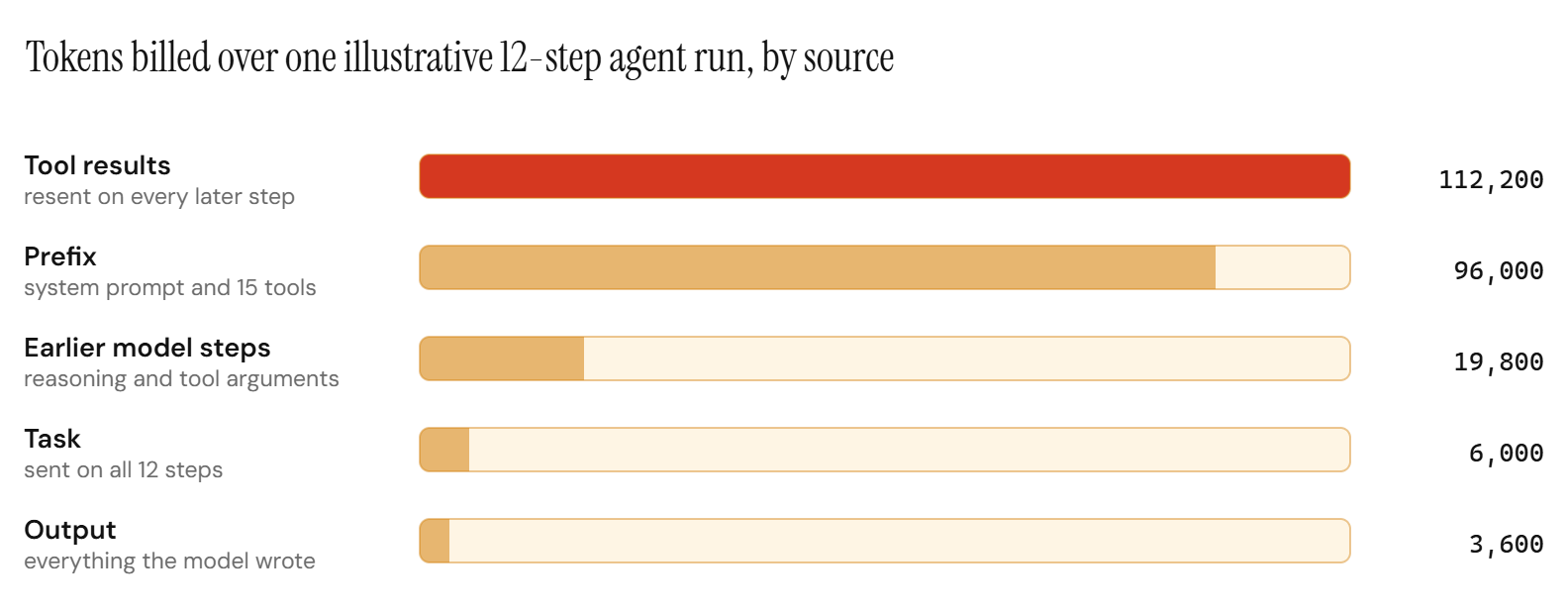
So agent cost work is mostly context work. Tool results the agent has already acted on are the largest line, and the prefix, identical on every step, is the second. Both are cheap to fix, and the rest of this guide uses the same run to show by how much.
Run length matters as much as content. Doubling this run to 24 API calls more than triples its input, to 756,000 tokens, which is why the long tail of runs drives so much of an agent's bill.
How do you measure what an agent run costs?
Log usage on every API call against a run ID, then report per run. A small ledger is enough:
from dataclasses import dataclass, field

# USD per million tokens, Claude Opus 5 list prices as of October 2026.
# cache_write is the 5-minute rate; 1-hour writes cost 2x base input.
PRICE = {"input": 5.00, "cache_write": 6.25, "cache_read": 0.50, "output": 25.00}

@dataclass
class RunLedger:
    run_id: str
    task_type: str
    steps: int = 0
    tokens: dict = field(default_factory=lambda: dict.fromkeys(PRICE, 0))

    def record(self, usage):
        # Anthropic reports cached tokens in their own fields, beside input_tokens.
        self.steps += 1
        self.tokens["input"] += usage.input_tokens
        self.tokens["cache_write"] += usage.cache_creation_input_tokens or 0
        self.tokens["cache_read"] += usage.cache_read_input_tokens or 0
        self.tokens["output"] += usage.output_tokens

    @property
    def cost(self):
        return sum(self.tokens[k] * PRICE[k] for k in PRICE) / 1_000_000
Pass the usage object of every response to record, including retries and any sub-agent working for the run. Then report four numbers per agent and task type:
| Metric | What it tells you |
|---|---|
| Cost per successful run | Total spend divided by runs that met the bar |
| Median run cost | What a normal run costs |
| p95 run cost and steps | How long the tail gets |
| Success rate | Whether a saving cost you quality |
import statistics

def cost_report(runs):
    """runs: list of (ledger, succeeded) pairs for one agent and task type."""
    costs = sorted(ledger.cost for ledger, _ in runs)
    wins = sum(1 for _, ok in runs if ok)
    return {
        "cost_per_successful_run": sum(costs) / max(wins, 1),
        "median_run_cost": statistics.median(costs),
        "p95_run_cost": costs[int(0.95 * (len(costs) - 1))],
        "success_rate": wins / len(runs),
    }
Divide by successful runs and keep the cost of failed runs in the numerator. A change that cuts the median by a third but sends more runs into retries can raise the cost per successful run. The p95 is where loops, retries and confused runs live, and since input grows with the square of the step count, a run twice the median length can cost about three times as much.
To set a target for that number from what the task is worth, see cost per task: measuring AI unit economics.
Which fixes cut agent token usage the most?
Apply them in roughly this order. The first five change only context and limits, so they carry little quality risk. The last two change how many agents or which model does the work, so they need an eval first.
| Fix | What it shrinks | Effort | Quality risk |
|---|---|---|---|
| Trim tool output at the source | Tool result tokens | Low | Low |
| Return structured tool results | Tool result tokens | Low | Low |
| Clear old tool results | Resent history | Low | Medium |
| Cache the static prefix | Price of the prefix | Low | None |
| Cap steps and spend per run | The long tail | Low | Low, with a handoff |
| Scope sub-agents | Duplicated context | Medium | Medium |
| Choose a model per step | Price per token | Medium | Needs a step eval |
Trim tool output at the source
The tool decides what enters the context, and everything it returns is billed again on every later step. A CRM lookup that returns the whole customer record, a search that returns ten full pages and a log query that returns raw lines are the usual culprits.
- Return only the fields the agent uses. Define a view per tool instead of serializing the database row.
- Cap rows and characters inside the tool, and say what was cut: "showing 20 of 1,240 rows, request page 2 for more". The agent can ask for more when it needs it.
- Filter verbose output in the tool: the failing test and its error, the matching log lines, the relevant section of a document.
- Keep error messages short and actionable, since a stack trace is resent too.
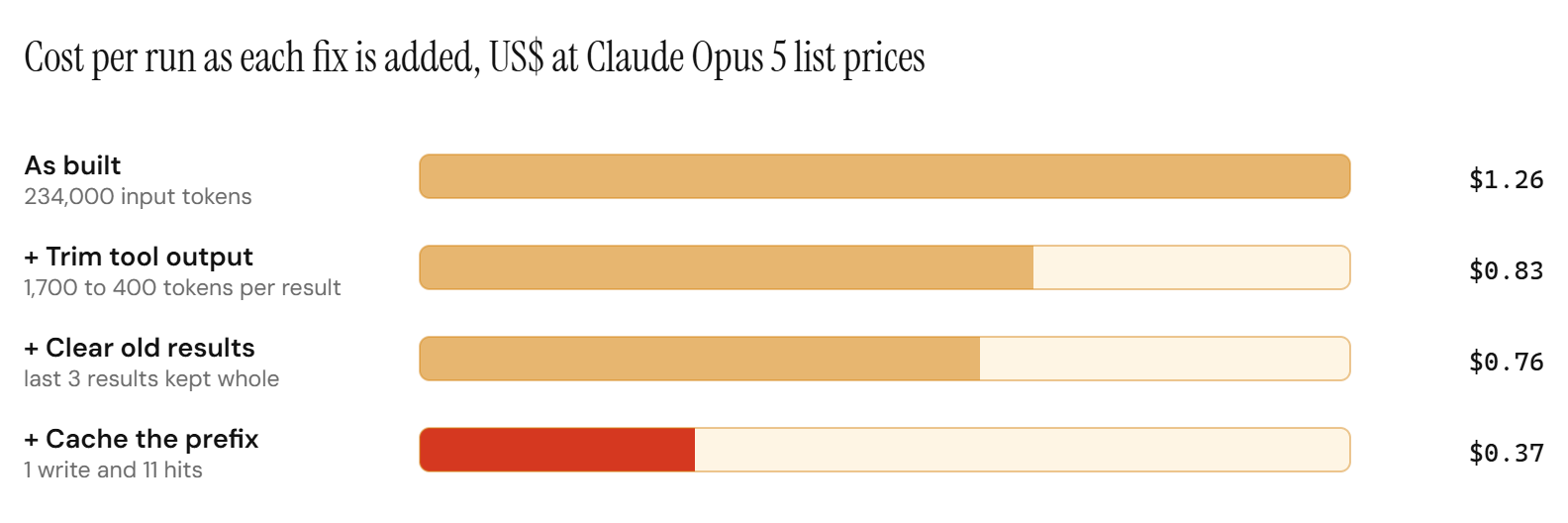
In the example run, cutting each tool result from 1,700 to 400 tokens lowers input from 234,000 to 148,200 tokens per run.
Return structured tool results
JSON with short keys and only the needed fields is compact, and the model reads it more reliably than free text. Return IDs and let the agent request details for the few records it actually needs. Keep the key order stable, since Anthropic's prompt caching documentation warns that languages which randomize key order during JSON conversion break caches.
Clear old tool results
Once the agent has acted on a result, it rarely needs the full text again. Replace older results with a one-line placeholder, or with the fact the agent took from them, and keep the most recent few whole.
Anthropic offers this on the server. As of October 2026, its context editing feature, in beta, includes a tool result clearing strategy that replaces older results with placeholder text once input passes a threshold you set, 100,000 tokens by default. Its compaction feature, also in beta, replaces older turns with a summary. The documentation notes that clearing tool results invalidates the cached prompt prefix from the point of clearing, so clear in large batches, enough to pay for rewriting the cache.
Keeping the last three results whole in the example run takes input from 148,200 to 133,800 tokens. The saving is modest here because the results were already trimmed. On the untrimmed run, the same rule would save 61,200 tokens by itself.
Cache the static prefix
Agents are the best case for prompt caching, because the same prefix is sent on every step, seconds or minutes apart. Anthropic's caching documentation describes the cached prefix as tools, system and messages, in that order, so the tool definitions and system prompt are cached together at the front. As of October 2026, Anthropic bills cache hits at a tenth of the input price on most Claude models and 5-minute cache writes at 1.25 times.
Three rules keep the hit rate high in an agent:
- Keep tool definitions fixed and in a fixed order for the whole run. The same documentation states that modifying tool definitions invalidates the entire cache, so load the full tool set up front and avoid adding tools mid-run.
- Keep timestamps, user names and run IDs out of the system prompt. Put them in the first user message.
- Log the cache read and write fields on every step, since a silent miss shows up only as a higher bill.
In the example run, caching the 8,000-token prefix turns 96,000 tokens at full price into one write and 11 hits, the cost equivalent of 18,800 tokens.
Cap steps and spend per run, with a clean handoff
Long runs cost more than their length suggests, so the tail needs a hard stop. Check the limits before every API call:
class BudgetExceeded(Exception):
    pass

def check_budget(ledger, max_steps=20, max_cost_usd=2.00):
    if ledger.steps >= max_steps or ledger.cost >= max_cost_usd:
        raise BudgetExceeded(
            f"run {ledger.run_id}: {ledger.steps} steps, ${ledger.cost:.2f}"
        )
Set the limits from data. Start near the p95 of successful runs plus some headroom, and review them whenever the agent changes. When a run hits a limit, end it cleanly: save a short summary of its state, hand the task to a person or a simpler path, and count the run as failed in the ledger. Our guide to human-in-the-loop for AI agents covers handoff design.
Add a loop check as well. An agent that requests the same tool with the same arguments twice in a row is usually stuck, and stopping it there is cheaper than waiting for the step cap.
Anthropic's task budgets feature, in beta as of October 2026, tells Claude how many tokens it has for a whole agentic loop so it can pace itself. The documentation describes that budget as advisory, so keep the hard limit in your own loop and use the budget for pacing.
Scope sub-agents tightly
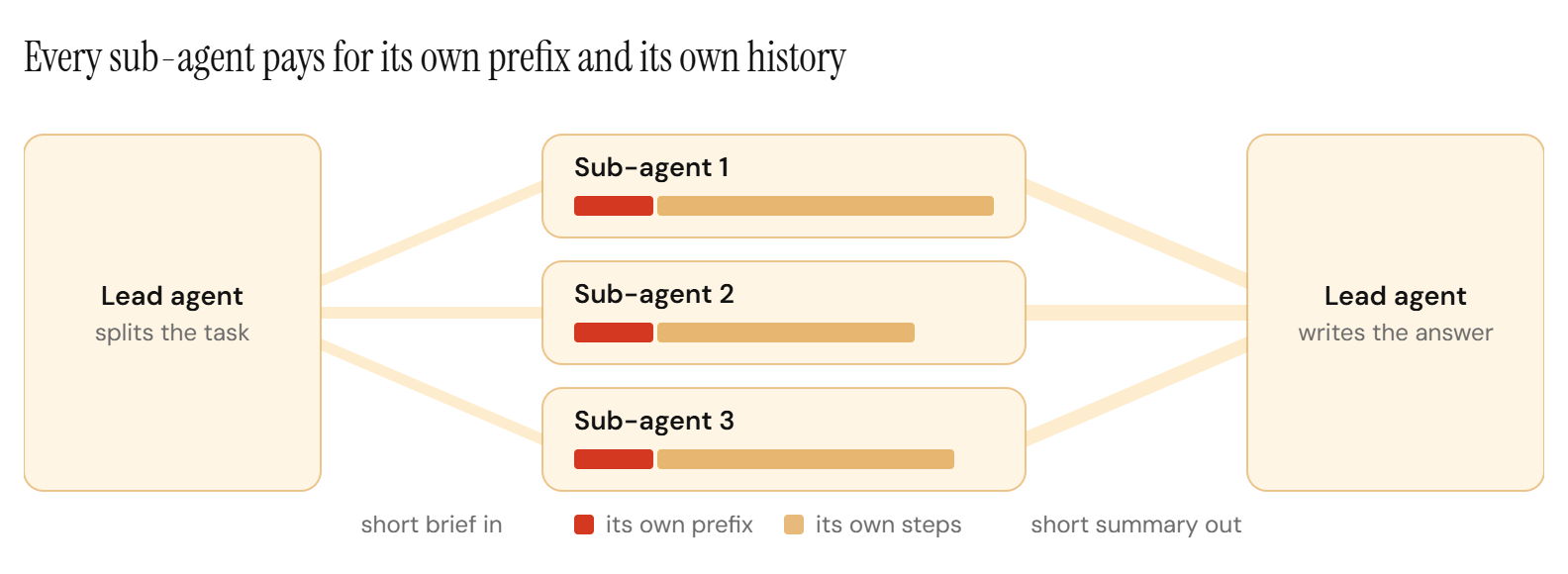
A sub-agent starts with a fresh context: its own prefix, its own brief and its own history. Fan-out multiplies the prefix and the history by the number of sub-agents, and the lead agent then pays to read what comes back. Anthropic's research system is the reference case. Its multi-agent runs used about 15 times the tokens of a chat, and Anthropic wrote that multi-agent systems need tasks valuable enough to pay for the increased performance.
- Use sub-agents for broad work that genuinely runs in parallel, such as researching several independent sources. Sequential work costs less in a single agent.
- Give each sub-agent only the tools its job needs, since a smaller tool set is a smaller prefix on every one of its steps.
- Have sub-agents return a condensed result. Write large outputs to storage and pass a reference, so the lead agent's context stays small.
- Cap the number of sub-agents per run, and put each one under the same step and spend checks.
Choose a model per step
Most agents use one model for every step, though the steps differ. Planning the approach and writing the final answer need the strongest model you can afford. Many steps in between are routine: pick the next tool, pull fields out of a result, classify a document, decide whether a check passed.
Those routine steps are where a cheaper tier pays. As of October 2026, Claude Haiku 4.5 costs a fifth of Claude Opus 5 per token, at $1 and $5 per million input and output tokens against $5 and $25, and GPT-6 Luna costs a hundredth of GPT-6 Astra. Test at the step level: log each step with a step type, replay a sample of each type against the cheaper tier, and move only the step types that pass. Measure the cache hit rate per model after the split. Our guide to LLM routing strategies covers how to shift that traffic safely.
Where does a custom model fit in an agent?
A production agent repeats the same few step types thousands of times a day. It classifies the request, extracts the fields, decides the next action and routes the case. Each of those is a narrow task with a checkable output and steady volume, which is the profile where a model trained for the task serves at a fraction of the frontier price.
Latency compounds in agents too. Every step waits on a model, so shaving seconds off one step type shortens a run once for every time that step appears in it.
That is the job of the adaptive model endpoint. An adaptive model endpoint is one API endpoint for one of your tasks: frontier models answer at the start, a custom model trained on your requests and your team's feedback takes over once it passes your evals, and hard cases stay on frontier models. In an agent, each routine step type gets an endpoint of its own.
Planning and the final answer can stay on frontier models throughout, so the agent keeps its judgement while its repeated steps get cheaper.
For the agent's code, the change is one model name on that step's API call. Each new version of the custom model runs in the background on real requests and is scored against your evals, and nothing switches without your sign-off. We monitor the model and retrain it as your tasks change. It runs Ertas-managed, in your cloud or on-premise, and you own it. The endpoint is currently invitation only, and we are developing a more streamlined version for wider access.
In our QMSum study, a 1.2B model trained for query-focused meeting summarization had an estimated serving cost of $0.00053 per query, against $0.104 for Claude Opus 5 and $0.0130 for GPT-5.6 Luna at synchronous list prices. It answered in 0.39 seconds against 9.0 seconds for Claude Opus 5. The estimate excludes training cost, and every task is different, which is why each switch waits on your own evals. For the break-even arithmetic on a specific task, see when a custom model beats a frontier API on cost.
In what order should you apply these fixes?
- Instrument first: the per-run ledger, cost per successful run, the median and the p95.
- Trim and structure tool output, usually the largest line in a run.
- Cache the static prefix, and fix anything in the prompt that breaks it.
- Add step, spend and loop limits, each ending in a handoff.
- Clear or compact old tool results on long runs.
- Scope sub-agents, and move routine step types to cheaper tiers that pass their step evals.
- Give the highest-volume step types a model of their own.
Rerun the ledger after each change and read cost per successful run and success rate together. A saving that lowers the success rate usually costs more than it saves.
Frequently Asked Questions
How many more tokens do AI agents use than chat?
In Anthropic's data, published in June 2025, agents typically used about 4 times more tokens than chat interactions, and multi-agent systems about 15 times more. The multiplier comes from the loop: every step resends the prefix and the full history of earlier steps.
What drives AI agent token costs the most?
Resent context. Tool results and the static prefix are billed again on every step, so input tokens usually make up most of an agent's bill. In the illustrative run in this guide, input was 93% of the cost at Claude Opus 5 list prices as of October 2026.
Does prompt caching work for AI agents?
Agents are the best case for it, because the same system prompt and tool definitions are resent on every step within minutes. Keep tool definitions fixed and in order, keep variable data out of the system prompt, and expect clearing old tool results to invalidate the cached history from that point on.
How do you stop an agent from running up a large bill?
Check a step limit and a spend limit before every API call, stop runs that repeat the same tool request, and end every stopped run with a handoff to a person or a simpler path. Set the limits from the p95 of successful runs and review them when the agent changes.
Should every agent step use the same model?
Planning and the final answer usually need the strongest model, while routine steps such as extraction and classification often pass on a cheaper tier. Test each step type against its own eval and move only the types that pass.
When does a custom model make sense inside an agent?
When one step type runs thousands of times a day, its output can be checked automatically, and the task stays stable from week to week. Those steps can move to a model trained for them behind an adaptive model endpoint, while frontier models keep the hard cases.
The Short Version
Agent cost is mostly context resent on every step. Measure cost per successful run with its median and p95, trim and structure tool output, cache the static prefix, clear old results, cap every run with a clean handoff, and keep sub-agents scoped. Then move the routine step types your agent repeats most to cheaper models, starting with a model trained for the busiest one.
If one agent step dominates your bill, book a call and we will look at it with you.
Sources: Anthropic, How we built our multi-agent research system, Anthropic context editing, Anthropic compaction, Anthropic task budgets, Anthropic prompt caching, Anthropic pricing and OpenAI API pricing. Prices and features verified 6 October 2026.