

To reduce AI token costs, split the bill into seat tools your staff use and workloads, the API calls your products and automations make. Workloads hold most of the savings, through four moves: match the model to the task, stop resending the same context, batch work that can wait, and give your highest-volume task its own custom model.
The pressure behind this question is real. In April 2026, Axios reported that IT budgets are being blown out as some companies spend more on AI than on employees' salaries. The price of a given level of AI capability keeps falling, yet total spend keeps rising, because usage grows faster than prices drop. Our guide to why AI costs are so high looks at that trend in detail.
This guide is for the executive or manager who owns that bill. It covers the questions to ask your teams, the order to act in, and when a custom model is worth it. The engineering detail behind each lever is in our companion guide, LLM cost optimization: 12 techniques ranked.
What is an AI token, and why does the bill grow so fast?
An AI token is the unit AI providers bill by: a short chunk of text, usually part of a word, counted on everything sent to a model and everything it writes back. Your bill is the number of tokens multiplied by the price of the model that processed them, so it grows whenever either one grows.
Four things push it up faster than most budgets expect.
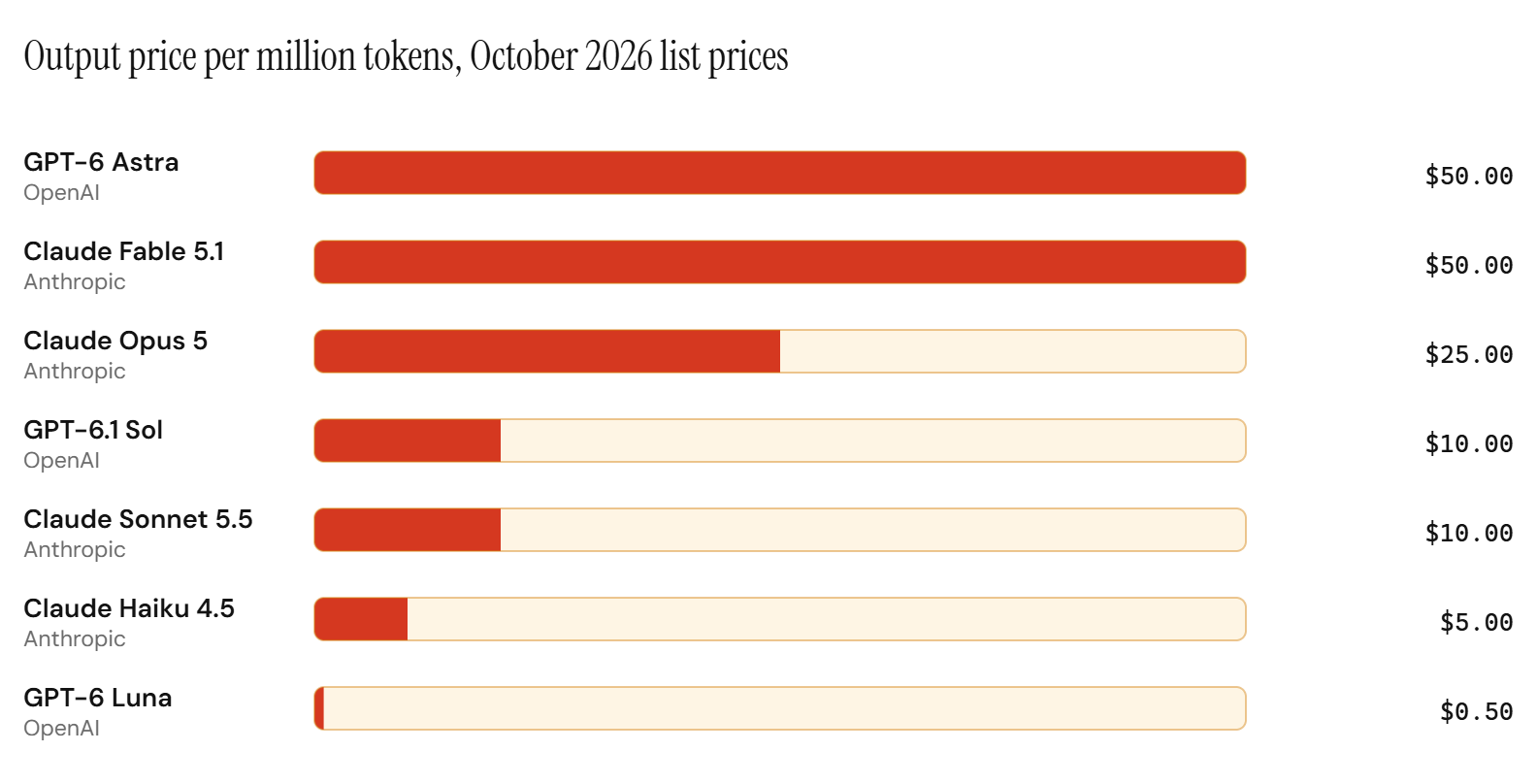
Output costs more than input. As of October 2026, Anthropic lists Claude Opus 5 at $5 per million input tokens and $25 per million output tokens, and OpenAI lists GPT-6 Astra at $10 and $50. Every token a model writes costs five times as much as every token it reads.
Reasoning adds tokens nobody sees. OpenAI's documentation states that reasoning tokens are billed as output tokens, even though the API never shows them. A model that thinks before it answers bills for the thinking too.
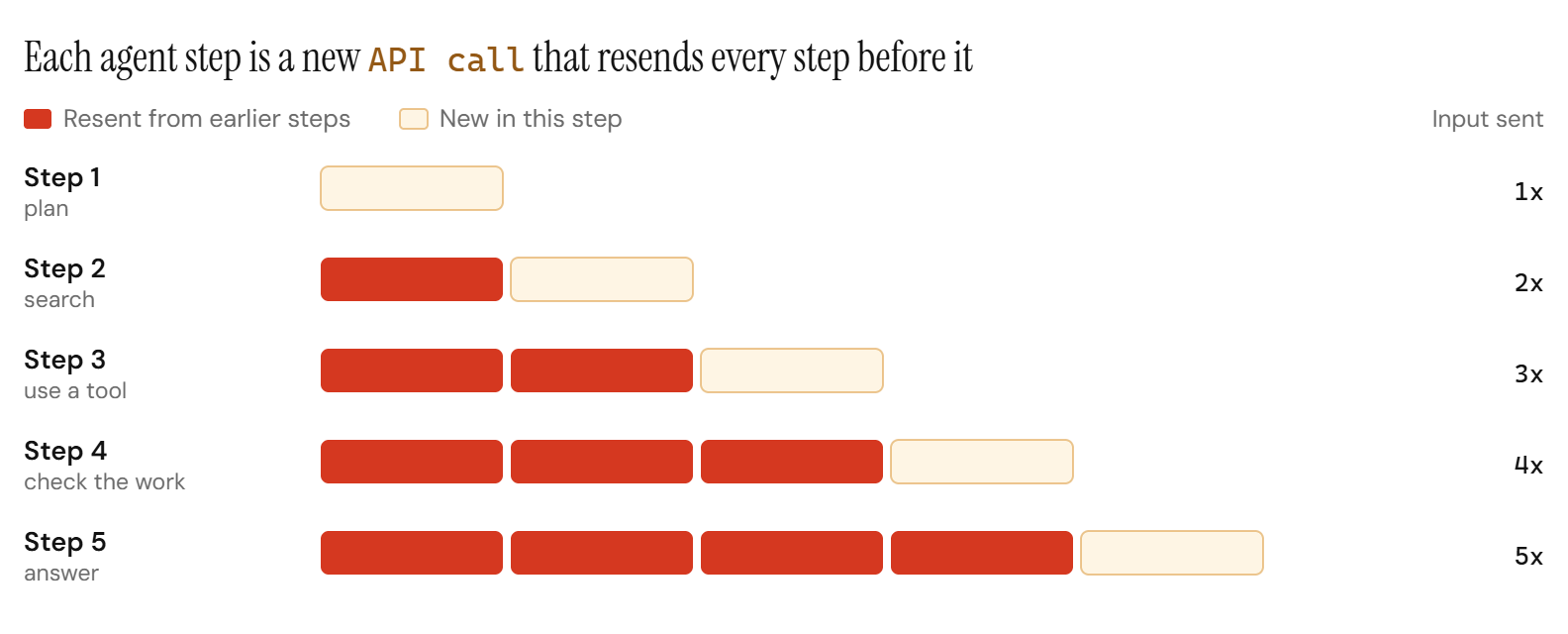
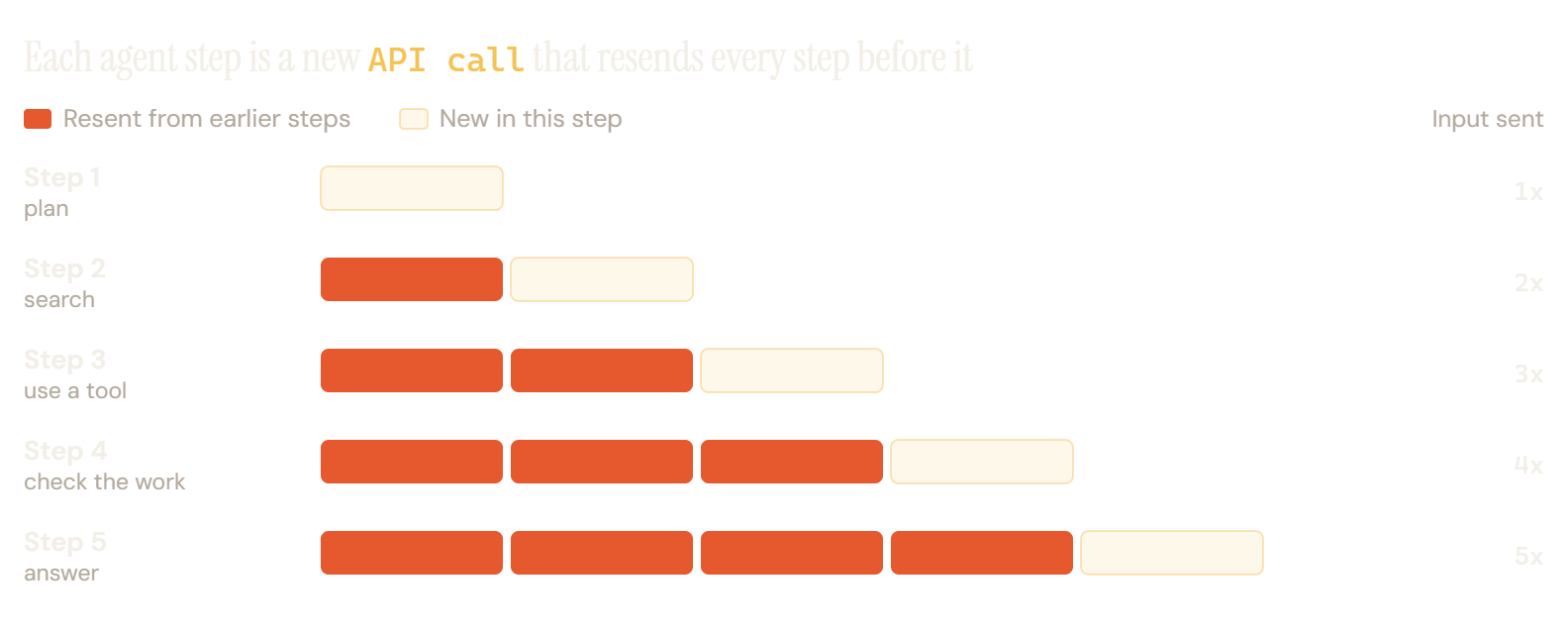
One request becomes many API calls. An AI agent handling a single customer request may plan, search, use tools and check its own work. Each step is a separate API call that resends the conversation so far, so the cost of one request climbs with every step.
The default model is often the most expensive one. Teams build a prototype on the strongest model available and move on. The spread between tiers is wide: as of October 2026, GPT-6 Astra output costs $50 per million tokens and GPT-6 Luna output costs $0.50, a 100x difference within one provider's lineup.
Per-token pricing carries its own hidden multipliers on top of these, covered in why per-token AI pricing costs 3-5x your estimate.
Where are your AI tokens actually going?
Start by splitting AI spend into two kinds. They grow for different reasons and they are cut with different levers.
| Spend type | Examples | Who drives usage | Main lever |
|---|---|---|---|
| Seat tools | Chat assistants, coding agents, copilots | Each employee | Allowances, defaults and habits |
| Workloads | Product features, automations, internal agents | Engineering teams | Model choice, caching, custom models |
Seat tools behave like a software subscription with a usage allowance on top. Workloads are where spend concentrates as AI moves into products, because a single feature can make thousands of API calls an hour without anyone typing a prompt. Our guide to AI token budgets for your teams covers how to set allowances, defaults and reporting for both.
For every workload, ask your engineering team for four numbers each month:
- API calls per month
- Average input and output tokens per API call
- The model each API call goes to
- The cost of one completed task, such as a resolved ticket, a processed claim or a drafted report
The fourth number is the one to manage. Cost per task ties AI spend to the work it does, so you can tell a bill that grew with business volume from a bill that grew because each task got more expensive. Providers report token counts on every response, so getting these numbers is a logging job for your engineers. Our guide to cost per task and AI unit economics shows how to calculate it and set a target.
How do you cut AI token costs without hurting quality?
Work through the levers in this order. The first three are configuration changes your team can make within weeks. The last one takes more setup and usually saves the most on your biggest workload.
| Lever | What changes | Effort | Saving on affected work |
|---|---|---|---|
| Match model to task | Cheaper tier for simple tasks | Low | Up to 100x price spread |
| Reuse repeated context | Prompt caching | Low | Cached input billed at 10% |
| Batch work that can wait | Asynchronous batch processing | Low | 50% off input and output |
| Limit agent loops | Step and budget caps per run | Medium | Varies by workflow |
| Give a big task its own model | Custom model for one task | Higher | Largest on high-volume tasks |
The figures are list prices from OpenAI and Anthropic as of October 2026. Each saving applies only to the work that lever touches, so the effect on your total bill depends on your mix of workloads.
Match the model to the task
Most companies run every task on the model they started with. Classifying a support ticket, pulling fields from an invoice or routing an email rarely needs the most capable model on the market.
Ask which workloads run on the top tier, and whether anyone has tested a cheaper tier on the same work. The test needs an eval: a set of real examples with known good answers that a model must score well on before it handles live work. An eval is what makes every later decision in this guide safe, so it is worth asking for one even before any model changes.
Stop paying full price for repeated context
Many workloads send the same long instructions, policies or reference documents with every API call. Prompt caching lets the provider store that repeated part and charge far less for it on later API calls.
As of October 2026, Anthropic bills cache hits at a tenth of the standard input price on most Claude models, and OpenAI lists cached input for GPT-6 Luna at $0.01 per million tokens against $0.10 standard. Ask whether your largest workloads are structured to use it.
Batch anything that can wait for results
Overnight reports, document backlogs, quality checks and bulk tagging can wait a few hours for results. As of October 2026, both OpenAI and Anthropic price batch processing at 50% of the standard rate for input and output tokens. It is often the fastest saving available, because only the timing of the work changes.
Put limits on AI agents
Agents are the fastest-moving line on most AI bills, because each run can take an unpredictable number of steps. Set a maximum number of steps and a token budget per run, and report cost per completed task for every agent in production. A run that hits its limit should stop and hand over to a person or a simpler path.
Give your highest-volume task its own model
When one task makes up a large share of your AI bill, such as triaging claims or summarizing customer calls, paying frontier prices for every repetition stops making sense. A custom model trained on that one task can handle the routine share of the work at a much lower cost per task, while frontier models keep the hard cases.
When does a custom model make sense for a high-volume task?
A custom model makes sense when a task runs at high and steady volume, the definition of a good answer is stable, and you can check quality with an eval. For smaller or fast-changing tasks, the configuration levers above usually do the job.
Use these five questions with your team.
| Question | Good sign for a custom model |
|---|---|
| How often does the task run? | Thousands of API calls a day |
| Is it the same job each time? | One task with a consistent output |
| Can answers be checked automatically? | An eval exists or can be built |
| Do we agree what good looks like? | A clear quality bar |
| Where must the data stay? | Managed, your cloud or on-premise |
If most answers point the right way, the task is a strong candidate. If the task changes every week, or nobody can say what a good answer looks like, settle that first, because a model can only be held to a bar that exists.
This is the work Ertas does with the adaptive model endpoint. An adaptive model endpoint is one API endpoint for one of your tasks: frontier models answer at the start, a custom model trained on your work takes over once it passes your evals, and hard cases stay on frontier models.
New versions arrive behind the same endpoint, so retraining never waits on a release from your team.
For your team, adopting it means changing one model name in their code. Each new version of the custom model runs in the background on real requests first, and nothing switches without your sign-off. We monitor the model and retrain it as your tasks change. It runs Ertas-managed, in your cloud or on-premise, and you own it. The endpoint is currently invitation only, and we are developing a more streamlined version for wider access.
The savings come from serving a model trained for one job. In our published QMSum study, a model trained for one meeting-summarization task had an estimated serving cost per query about 99% below Claude Opus 5 at list prices, and it answered 23 times faster. Every task is different, which is why each switch waits on your evals.
A 30-day plan to cut your AI token bill
Here is how the steps above fit into one month, with an owner for each.
| Week | Action | Owner |
|---|---|---|
| 1 | Split spend into seat tools and workloads | Finance with engineering |
| 2 | Log cost per task for the top workloads | Engineering |
| 3 | Apply batching, caching and model right-sizing | Engineering |
| 4 | Pick one high-volume task and scope a custom model | Product and engineering leads |
By the end of the month you have a baseline, the quick savings banked, and a decision on your largest workload. Fold the numbers into next year's plan alongside the rest of your AI infrastructure, as covered in our guide to enterprise AI budget planning.
Frequently Asked Questions
How much can a company save on AI token costs?
It depends on the mix of work. On the work each lever touches, the list-price effects as of October 2026 are clear: batch processing costs 50% less at OpenAI and Anthropic, cached input costs about a tenth of standard input, and cheaper tiers can cost up to 100 times less per output token. A custom model on a high-volume task usually moves the total most, because it lowers the price of the largest workload.
What is the difference between seat costs and workload costs?
Seat costs come from tools employees use directly, such as chat assistants and coding agents, and are managed with licenses and usage allowances. Workload costs come from the API calls your products, automations and agents make on their own, and they scale with business volume. Most of the savings in this guide apply to workloads.
Will cheaper models lower the quality of our AI features?
They can if you switch blind. Run the cheaper model against an eval, a set of real examples with known good answers, and move only the tasks where it meets your quality bar. Keep the eval running after the switch so a drop shows up in a report before it shows up in customer complaints.
Do we lose access to frontier models if we use a custom model?
No. With an adaptive model endpoint, hard cases keep going to frontier models, and the custom model takes the routine share once it passes your evals. You keep frontier quality where it matters and pay less on the repetitive work.
Who owns a custom model that Ertas builds?
You do. The model is trained on your work for your task, and it runs Ertas-managed, in your cloud or on-premise. We monitor it and retrain it as your tasks change.
How long does it take to see savings?
Batching, caching and model right-sizing can show up in the next monthly bill, since they are configuration changes. A custom model takes longer because it has to pass your evals before it takes traffic. Your frontier model keeps answering in the meantime, so nothing waits on it.
The Short Version
AI token costs grow with volume, output length, reasoning and agent steps. Split the bill, measure cost per task, take the configuration savings first, then give your largest repeated task a model trained for it.
If one task already dominates your bill, book a call and we will look at it with you.
Sources: OpenAI API pricing, Anthropic pricing, OpenAI reasoning guide and Axios. Prices verified 6 October 2026.