

An AI token budget is a monthly spending allowance for AI usage, set per team or per task and tracked in dollars. Set one in three parts: a default allowance for the AI tools each employee uses, showback so every team sees its own spend, and a cost-per-task budget for each workload your products run.
Token budgets became a management topic in 2026. In April, Uber's CTO said the company had used its entire 2026 budget for Claude Code four months into the year, as Quartz reported. In June, Bloomberg reported that Uber now limits each employee to $1,500 a month in token spending per AI coding tool, and Walmart had capped staff use of its in-house AI agent.
A cap added after the money is gone is the blunt version of a token budget. This guide is the planned version: what to budget, at what level, and how to keep the budget a guardrail around useful work. It builds on how to reduce AI token costs in your company, which covers where tokens go and the levers that cut them.
What is an AI token budget?
An AI token budget is the amount a team or a task may spend on AI model usage in a month, set in dollars and reported in both dollars and tokens. Dollars are the right unit because token prices vary so widely. As of October 2026, an output token from GPT-6 Astra costs 100 times one from GPT-6 Luna, so a million output tokens can cost $0.50 or $50 depending on the model.
Your AI spend splits into two kinds, and each needs its own budget.
| Seat-tool budget | Workload budget | |
|---|---|---|
| Covers | Chat assistants, coding agents, copilots | Product features, automations, internal agents |
| Unit | Dollars per person per month | Dollars per completed task |
| Grows with | Headcount and habits | Business volume |
| Owner | Each team's manager | Product or engineering lead |
| Main control | Allowances and default models | Cost per task |
Seat tools are where most managers feel the problem first, because usage depends on how each person works. Workloads are where more of the money goes as AI moves into products, because a single feature can make thousands of API calls an hour without anyone typing a prompt.
How do you set an AI token budget for each team?
Start from measured usage, set allowances by role, make the cheaper model the default, and decide in advance what happens at the limit.
1. Measure a baseline before you set a number. Run one or two months with reporting switched on and generous limits, then look at spend per person, per tool and per model. As of October 2026, Anthropic's Claude Code documentation puts the average cost across enterprise deployments at $150 to $250 per developer per month, with 90% of users below $30 per active day. Uber's figures were in the same range, with its heaviest users at $500 to $2,000 a month, according to the Quartz report. Treat published averages as a sanity check on your own numbers.
2. Set allowances by role. One company-wide number is too tight for engineers running coding agents and far too loose for staff who open a chat assistant a few times a day.
| Role group | Main AI use | How to set the allowance |
|---|---|---|
| Most staff | Chat and writing help | The seat plan's included usage |
| Analysts and operations | Long documents and research | Measured median plus headroom |
| Software engineers | Coding agents | A monthly budget per tool |
| Automation owners | Scheduled agents and pipelines | A workload budget per task |
Uber's cap is a useful reference for the engineering row. At $1,500 per tool per month, it sits six to ten times above the typical $150 to $250, so it trims the long tail and leaves ordinary use alone.
3. Make the cheaper model the default. Much of a seat-tool bill is decided by the model a tool uses when nobody picks one. Set a mid-tier model as the default for coding and a low-tier model for simple chat, and make the top tier a deliberate choice for hard problems. Anthropic's documentation traces unexpectedly high Claude Code spend to two habits: long sessions that were never cleared, and Opus left as the default model.
4. Write down what happens at the limit. Decide whether a person who reaches their allowance waits for the reset, moves to a cheaper model or asks for more, and keep the request path to a day or less. The tools support this as of October 2026: members of Claude Team and Enterprise plans can send a request for more usage to their admins from inside Claude Code, and Cursor Enterprise and GitHub Copilot let admins set limits per person.
Give long autonomous agent runs the same treatment. A run that will take hours, or fan out into many parallel agents, deserves a quick approval and its own budget. Anthropic's documentation puts Claude Code agent teams at about seven times the tokens of a standard session when teammates run in plan mode. Our guide to agentic AI cost optimization covers how engineers bring that number down.
How do you keep a token budget from slowing your teams down?
A token budget works when people can see their own spend, the limit sits above normal use, and getting more takes a day or less. Three practices make that happen.
Showback first, chargeback later. Showback means reporting each team's AI spend back to that team every month, by person, tool and model, while the money stays in a central budget. Chargeback moves the cost into the team's own budget. Start with showback, because visibility changes habits by itself. Uber's COO observed that engineers who never see the invoice can treat AI tools as essentially free, as Quartz reported. Move to chargeback once teams have a few months of their own numbers to plan from.
Reward outcomes and leave token volume out of it. A leaderboard of token use turns spend into a status symbol. Amazon shut down an internal leaderboard that tracked AI token use after it encouraged some staff to run tasks just to climb the rankings, according to Business Insider as cited by Bloomberg. Report what each team shipped and its cost per task next to its spend.
Review monthly, in thirty minutes. One meeting, one table, run by the budget owner.
| Agenda item | Question to answer |
|---|---|
| Spend against budget | Which teams are over or under, and why? |
| Top users | A workflow to share, or a runaway loop? |
| Default models | Has a cheaper tier passed the team's tests? |
| Raised limits | Were last month's approvals worth it? |
| Workloads | Did cost per task move? |
The heaviest users are often the people with workflows worth copying, and occasionally the owners of a scheduled job nobody remembered to stop. Both are worth finding.
How do you reduce token usage in Claude Code, Cursor and Copilot?
Teach a few session habits, default to a mid-tier model, and use the spend controls each vendor now provides. Coding agents are the largest seat-tool line for most engineering teams, because every message carries the files read, the command output and the conversation so far.
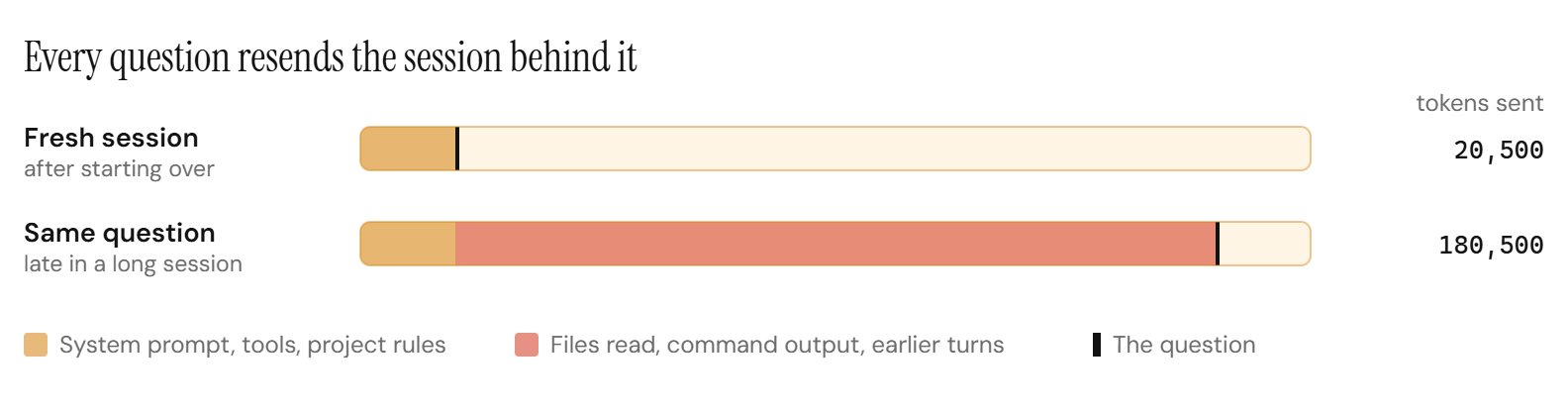
The habits below come from Anthropic's Claude Code guidance, and the same principles apply in Cursor and Copilot:
- Start a fresh session between unrelated tasks. In Claude Code that is
/clear. A one-line question in an all-day session still pays for the whole day's context. - Default to the mid tier. Reserve the top model for architecture decisions and hard debugging.
- Keep always-loaded instructions short. Project rules files load into every session. Anthropic suggests keeping CLAUDE.md under 200 lines and moving specialist instructions into skills that load only when used.
- Lower reasoning effort for simple work. Thinking tokens are billed as output tokens, the most expensive kind.
- Ask for specific changes. A request to add validation to one named function reads a few files. A request to improve the codebase reads many.
- Watch background work. Scheduled loops, parallel agents and agent teams keep spending while nobody is looking.
The admin side is now well covered. Here is where each tool shows spend and how to cap it, as of October 2026.
| Tool and plan | Where spend shows | How to cap it |
|---|---|---|
| Claude Code, Team or Enterprise | Spend report per user and model | Limits per organization, group or member |
| Claude Code, Console (API) | Console usage page and dashboard | Workspace spend limits |
| Cursor, Teams | Admin dashboard, per user | One team-wide monthly limit |
| Cursor, Enterprise | Admin dashboard, per user | Team, group and member limits |
| GitHub Copilot, Business or Enterprise | Usage in AI credits | Budgets per enterprise, cost center or user |
Three details matter when you set these. On Claude Team and Enterprise plans, usage first draws on each seat's included allowance, and spend limits govern usage beyond it. Since June 2026, GitHub Copilot bills Business and Enterprise usage by tokens in AI credits worth one cent each, and pools each seat's included credits across the organization, so a few heavy users can drain the pool for everyone unless user-level budgets are set. Cursor bills third-party model usage beyond the included amount at list API prices plus a $0.25 per million token rate.
How do you budget AI workloads?
Budget each workload as tasks per month multiplied by cost per task, and put the alert on cost per task. The total grows when the business grows, which is usually good news. The cost per task grows when something got less efficient, such as a longer prompt, a pricier model or an agent taking more steps.
Take a support workload that triages 200,000 tickets a month at $0.06 per ticket, a $12,000 line.
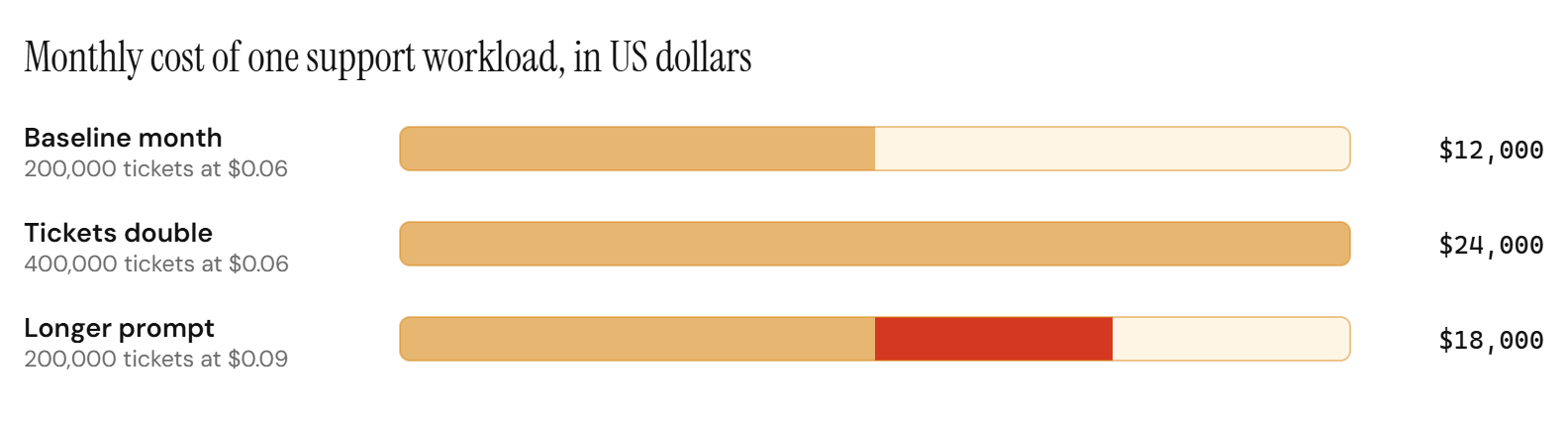
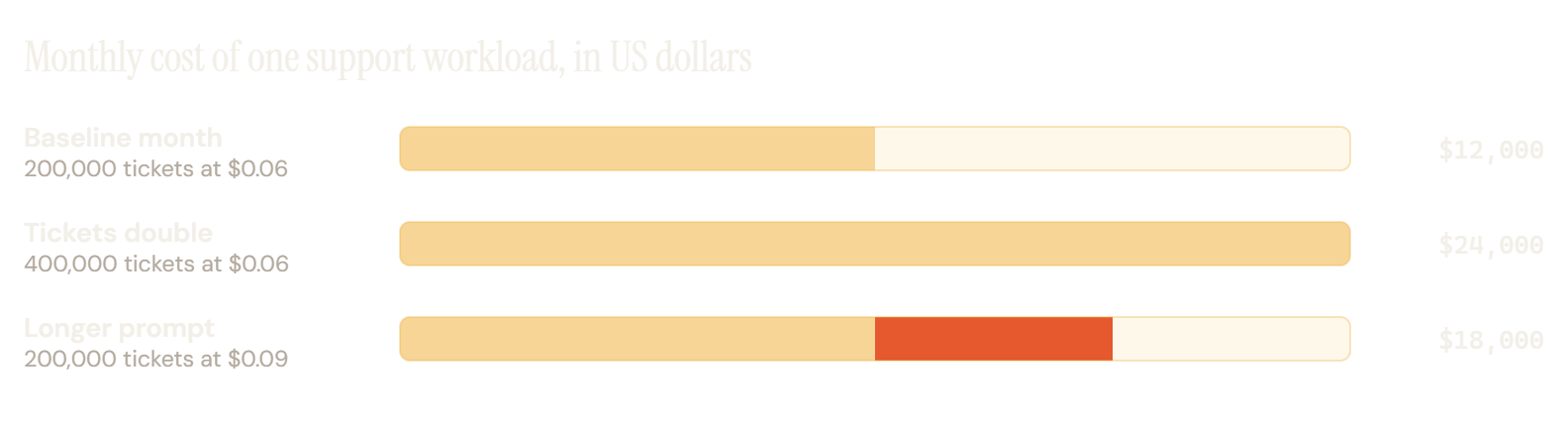
A workload budget therefore has two parts:
- A volume forecast, owned by the business, taken from the same plan that forecasts tickets, claims or orders.
- A target cost per task, owned by engineering, with an alert when it drifts more than an agreed margin, such as 10%.
Lowering the cost per task starts with configuration: batching work that can wait, caching repeated context and moving each task to the cheapest model that passes its tests, all ranked in 12 LLM cost optimization techniques. Our guide to cost per task and AI unit economics covers how to set the target.
When one task makes up most of a workload line, such as triaging tickets or extracting fields from claims, the larger lever is the price of that task itself. A custom model trained on the task can answer the routine share at a much lower cost per task, while frontier models keep the hard cases.
Where does a custom model fit in a token budget?
A custom model belongs on the workload side of the budget, on a task that runs at high and steady volume, has a stable definition of a good answer, and has an eval to check it. It lowers the cost per task on that line, and frontier models stay in the budget for hard cases and for everything else.
This is what the adaptive model endpoint is for. An adaptive model endpoint is one API endpoint for one of your tasks: frontier models answer at the start, a custom model trained on your requests and your team's feedback takes over once it passes your evals, and hard cases stay on frontier models.
Every request the custom model answers leaves the frontier line of your budget, and the hard ones still reach a frontier model.
For the budget owner, three things follow.
The largest line gets smaller. In our published QMSum study, a model trained for one meeting-summarization task had an estimated serving cost of $0.00053 per query, against $0.104 for Claude Opus 5 and $0.0130 for GPT-5.6 Luna at synchronous list prices, and it answered in 0.39 seconds against 9.0 seconds for Claude Opus 5. The estimate excludes training cost, and every task is different, which is why each switch waits on your evals.
The line becomes more predictable. The routine share of the task runs on a model you own, so its cost per task stays put when frontier price lists or default models change.
Your team keeps control. Each new version runs in the background on real requests first, and nothing switches without your sign-off. We monitor the model and retrain it as your task changes. It runs Ertas-managed, in your cloud or on-premise, and you own it. The endpoint is currently invitation only, and we are developing a more streamlined version for wider access.
For how this line sits next to the rest of next year's plan, see our guide to enterprise AI budget planning.
Frequently Asked Questions
What is a token budget?
A token budget is a limit on how much a person, team or task may spend on AI model usage in a set period, usually a month. It is set in dollars, because token prices differ by up to 100 times between models, and it is reported in both dollars and tokens so teams can see what drove the spend.
How much should we budget per employee for AI tools?
Set it from your own measured usage, by role. As a reference point, Anthropic reports an average Claude Code cost of $150 to $250 per developer per month across enterprise deployments as of October 2026, and Uber caps agentic coding tools at $1,500 per employee per tool per month. Most non-engineering staff need far less, often just their seat plan's included usage.
Should a token budget be set in tokens or dollars?
Set it in dollars and report both. A million output tokens can cost $0.50 or $50 depending on the model, so a budget in tokens says little about cost. Token counts are still useful in the report, because they show whether spend rose from more usage or from a pricier model.
Will token budgets slow down our engineers?
A well-set budget sits above normal use, so most engineers never reach it. Uber's $1,500 cap per tool is six to ten times the typical monthly cost Anthropic reports for Claude Code. Pair the limit with a fast request path and showback, and avoid rewarding token volume, which encourages waste.
What is the difference between showback and chargeback?
Showback reports each team's AI spend back to that team while the money stays in a central budget. Chargeback moves the cost into each team's own budget. Start with showback to build habits and a baseline, then move to chargeback once teams can forecast their own usage.
How does a custom model affect a workload's token budget?
It lowers the cost per task on the workload it serves, which is usually the largest line in the budget. With an adaptive model endpoint, frontier models answer at the start and keep the hard cases, and the custom model takes the routine share once it passes your evals. The model runs Ertas-managed, in your cloud or on-premise, and you own it.
The Short Version
An AI token budget sets how much each team and each task may spend on AI in a month. Measure first, set allowances by role, default to the cheaper model, show every team its own spend, and budget workloads by cost per task. When one task dominates the workload line, give it a model trained for it.
If one workload already takes most of your token budget, book a call and we will look at it with you.
Sources: Quartz, Bloomberg on Uber's caps, Bloomberg via Transport Topics, Claude Code cost documentation, Cursor spend limits, Cursor Teams pricing, GitHub Copilot usage-based billing and OpenAI API pricing. Prices and product controls verified 6 October 2026.